I have been using synergy for a little while now and I must say I like it. Basically, it allows you to use one keyboard and one mouse in front of you to switch to other machines with their own display around you. Today while waiting on some other stuff to finish I wanted to set it up a little better. I try to optimize my flow as much as possible and it breaks my work flow to realize that I haven't started synergy yet on all the machines.
So I followed some of the steps and did some tweaking (saving my config in Savon as I go for my kids), so now the synergy server on my desktop is active as soon as gdm starts, and also when I log in. I have my laptop to the left, another workstation to the right, and I just flip between them by moving the mouse to the edge of the screen. Smooth.
Next step is to get synergy running on the N800. Although at that point, I guess it would be preferable to actually use just the one screen for access to all the machines. Is there anything out there that integrates as nicely as Synergy and also shares your current display ? I guess ideally I would like something that, when I move the mouse to the top of the screen for long enough, visually a cube spins and drops me in the "display" (I guess using VNC ?) of another machine. That would be awesome...
Synchronisation
(Caveat lector: the following may be incredibly boring if you do not care about multimedia)
The last two weeks Julien and I spent a lot of time on synchronisation in Flumotion in various corner cases. Ogg/Vorbis/Theora synchronisation has been rock solid ever since we discovered and fixed the last sync bug in Flumotion at last year's GUADEC. We are now fixing similar bugs for Windows Media and Flash Video.
I should probably explain a little on what the issues are when dealing with synchronisation.
Prologue
In any kind of discussion about synchronisation, there are two possible ways that audio and video can be out of sync. First of all, there can be an offset between the two streams: the audio and video are out of sync by a constant margin. There are lots of reasons why this could happen. Audio and video coding could each introduce a delay that is different and not taken into account. DVD's have audio and video tracks that have their first piece of data at different timestamps; but your transcoding application does not take this into account. Your cable box is probably playing the audio slightly (say, 40 ms) later than it should, and once you notice that it's a little out of sync, you can never shake that feeling again.
Second, there can be drift between the streams. The clocks driving the streams are running at a different rate, and as time moves on the two streams drift further apart. Drift could be approximately linear, or random, or even random in such a way that the signals can drift in and out of sync again. This happens for example when you use two soundcards to do multitrack recording, but the crystals of the cards are different, and one hour of recording gives you one track that is three seconds longer than the other and your mix sounds echo-y and crappy. Or it happens when you actually believe that your TV card really gives you 50 fields a second, and your sound card gives you 44100 a second, but in reality they never do. Or it happens when your software makes subtle and accumulative rounding errors.
Offset
These two factors for synchronisation problems come back at various levels in the stack, and can be caused by many different things, and fixed in many different ways. Offset problems are typically easier to spot and fix than drift problems - you notice that your dvd rip is out of sync by a constant margin, you look at some timestamp info, and you see that you forgot to take into account the non-zero first timestamp. Or, you realize that the codec you are transcoding to (say, for example, Theora) is not only fixed-framerate (meaning, the time difference between every two frames has to be equal), but you also have to encode on multiples of this basic interval. If your first video frame is 60 ms after the first audio sample, and the video is 25 fps, your first video frame is precisely in the middle of two frame positions, and you have no other way than to store the video frame with a 20 ms sync offset - unless you try to be smart and adjust
the audio samples.
drift
Drift problems are typically a lot harder. The first problem is that it takes some time before you can actually see that there is a problem. There are a lot more factors that can contribute to drift.
The most important rule for correct drift handling is that all the capture needs to be done against the same reference clock. This clock can be real, or it can be "synthesized", constructed out of an external signal (in reality, all clocks are synthesized somehow, it's just that some feel more real than others). If you break this simple rule, you will never end up being in sync.
There are lots of clocks to choose from. You can take a system clock. It may be kept uptodate by ntp however, so it may not be a good source for a reliable clock. You can take the kernel's non-adjusted clock, not affected by ntp. You can take some kind of network clock, drawing from a source somewhere else, or from an RTP stream. You can synthesize a good clock from a soundcard when you are reading samples from it, or even from a DV or DVB stream, or even from your 50 Hz TV card. To avoid drift, the resolution of this clock is not terribly important. What is important is that this clock is reasonably linear.
This first rule also implies that all capture should follow this clock. In practice, this means that you can follow at most one device in your pipeline, and so at most one captured stream can be captured unprocessed. All the others need some kind of adjustment to follow the master clock. This can mean various things. If your non-master device is a soundcard, you will end up resampling your captured buffers to match the time interval needed to capture. If it's a TV card, you will end up dropping or duplicating frames once in a while, or even interpolating. You don't have to do this at the source - at the source it is only important that you give every captured buffer a proper timestamp according to the master clock, regardless of what the device's internal clock says.
I remember years ago trying to get a commandline recorder called vcr to work reliably and wondering why it always drifted out of sync, and this was probably the reason, and it took some time for me to understand the simple fundamentals.
hidden offsets
There are some additional problems when trying to correctly timestamp captures. There are delays that you can't always take into account, and you can't always easily get at the clock data you need. Consider an example where your sound card is the master clock, and you're capturing video from a USB webcam. Typical webcams are very bad at delivering a constant framerate. So you are following your sound card's clock, trusting it to really give you 44100 samples per second (even though that is probably a lie). So your code does some ioctl call and blocks until it receives a video frame from the kernel, and then it returns to your code. And the next call, bam, you sample your audio clock and you slap that timestamp on your video buffer as fast as you can. Mission accomplished.
Well, not really. You probably did handle the drift correctly - over time, the audio and video will never be much out of sync. But there is a potential for a hidden offset. First of all, how long did it take for the camera to make the picture ? Some cameras take half the frame duration to assemble the frame. Second, how long did it take to go over the USB bus, get decoded in the kernel module, and be ready for delivery to your process ? And third, how long did it take for your process to wake up and get the frame delivered ? The first two may not sound like a big deal, but if your webcam is doing 7.5 frames per second, half a frame difference is very noticeable. And the third kind of delay can easily deliver you a few frames late, and even drop a few frames.
Are there solutions for this ? Well, depends. The best thing to do is to eliminate as many unknowns as possible by sampling a clock as close to the capture as possible. So the obvious first step is to sample the clock in the kernel module, before going to userspace. With most sound API's this is already done. In the V4L2 API it is possible to receive timestamps for every buffer. It's not ideal though - you still have the USB problem, and I still can't be sure from the API docs of V4L2 whether or not the timestamps are coming from the system clock, or from some unadjusted clock (say, CLOCK_MONOTONIC from clock_gettime). I distinctly recall there being a footnote in one version of those API docs that said "We use the system clock now. It would be more correct to use an unadjusted monotonic clock, but since there are no applications doing this we have not implemented this." (As a non-kernel hacker, I am surprised that a kernel hacker would expect an application developer to support something before it exists).
But let's assume you've fixed this problem somehow, and you sampled some clock as close to capture as possible, and now your user-space code receives the buffer with this timestamp. You're not there yet. Remember the golden rule - the timestamp you have is coming from the wrong clock !
Well, luckily you can correlate clocks and, assuming they are more or less linear, figure out their relative offset and drift with some easy formulas. So, let's call your audio clock A and your system clock B. You have a timestamp taken from B at the time of capture, and you want to know what clock A's timestamp at that time was. Luckily, you can sample the system clock B in user space, figure out how much time has passed against clock B since capture, and translate that to how much time has passed in A. So you can retimestamp your buffer with the current time according to A, minus the reception delta also according to A.
Phew. Of course, I am both overcomplicating (you could assume that clock A and clock B are close enough to each other that the delta is relatively similar against both clocks, compared to the frame interval) and oversimplifying (you may be trying to get small details right while the kernel is scheduling everything away from underneath you and messing up your precious code).
But the bottom line is that, if you follow the golden rule, you can solve drift problems originating in capture.
(You may find that pages like this do a better job of explaining the technicalities, compared to my rambling).
dropping
There is one more problem that can happen during capturing: samples can be dropped due to high load, broken wires, ... Rule number two becomes: all imperfections should only have a local, short-lived effect. You need to avoid that small temporary problems accumulate over time.
This is more of a problem for a stream from which you are synthesizing a master clock - since you are counting samples, dropped buffers will make the virtual clock stand still. It helps a lot if the API has some way of telling you how many samples you dropped - because you can "fill in the blanks" when you're sampling again since you know the rate at which you dropped. For capturing, it is less of a problem since you're already ignoring the internal clock in favour of your master clock, though it is still good to know, if possible, that frames were dropped.
processing
Drift can also be introduced simply due to programming errors. Imagine an element that is resampling to a different sample rate. Suppose the programmer is lazy, and uses an algorithm that goes like this:
- start with a timestamp of 0
- process incoming samples
- set the duration based on the number of samples, multiplied by the rate
- push buffer
- increase the timestamp by the duration
- repeat
Harmless enough, no ? Except this breaks rule number 2. Step 3 can introduce a rounding error. This rounding error is then accumulated because all these durations are added to form the timestamp. Worse, in a lot of cases the rounding error is always the same because you process the same number of samples. Suddenly, the local problem of the rounding error has a global effect due to a wrong algorithm. Is this important enough to worry about ? Let's see.
Let's say I process 1/30 a second of data in each buffer. Let's say my framework timestamps in microseconds. Man, six digit sub-second precision ! Every buffer I process, I introduce a rounding error of 1/3 of a microsecond. After a second, I am 10 microseconds off. After a minute, 600 microseconds. After an hour, 36 ms. Hm, that's already slightly noticeable as a drift. Suddenly microseconds aren't enough.
That is one of the reasons why GStreamer uses nanosecond precision - the above programming approach would result in 6 ms a week. It would take a month and a half to get noticeable drift.
How do you eliminate the mistake ? By recalculating the timestamp for every new buffer based on an integer base value. You count samples exactly, and you multiply by the rate for each timestamp. What can you do if the rate is allowed to change during the lifetime of the element ? You can calculate a new base_timestamp every time the rate changes, and reset the sample counter. This will introduce a rounding error, but a lot less often. If you're paranoid about that, you can still take the rounding into account into an additional variable, but let's not overdo it.
How do you make a perfect stream out of this ? By always calculating the duration as the difference between the next timestamp and the current timestamp. Yes, two buffers will go out with 0.033333333 seconds, and one with 0.033333334, repeatedly. Yes, this is a rounding error. But the rounding error is local and negligeable.
codecs
After that, there are other problems to deal with. As said before, a lot of codecs only support fixed frame rate. Marvel ! as you manage to bend space and time and accurately timestamp your video frames to the precise nanosecond ! Giggle ! as you clearly notice that your webcam is not coming close to giving you 7.5 frames per second at regular intervals ! You want to save this pinnacle of capture perfection for posterity. Cry ! as you notice that the frames you stuff into your codec get shoehorned in at a fixed rate, and the resulting playback is jittery and out of sync with the audio.
In the GStreamer world, to satisfy these codecs, we need to synthesize a perfect stream out of these real-world captured-in-the-wild streams. Every buffer in GStreamer has a timestamp, a duration, an offset, and an offset_end. The timestamps are in nanoseconds, and the offsets in basic units - samples for audio, frames for video. Imagine a perfect stream - a stream so perfect that every buffer stitches together with its predecessor. The difference between the timestamps is exactly the duration ! The offset of a buffer is exactly the offset_end of the previous one ! Not a single buffer is dropped ! Data is being generated at exactly the nominal frame rate ! Why, such a stream would have no problem at all being shoehorned into these unreasonably demanding fixed frame rate codecs.
Now, look at the streams you actually have from your devices. Suppose your audio clock was the master clock. If no buffers were dropped, then hey, you are getting a perfect stream for the audio ! That's nothing special of course, because its clock is counting exactly at the fixed rate using the samples it captures. Its clock is saying that 44100 samples is exactly 1 second. All the buffers line up and the stream is perfect.
But the webcam stream ? Oh my god. If you're lucky, the offsets line up correctly. Every buffer is a frame, no frames were dropped. So far so good. But the timestamps ? All over the place. You have only one choice for your fixed-rate codec - you must resample your video frames at the rate the codec requires. In the most simple case, you can do this by dropping and duplicating once in a while - this is what the videorate element does. But ideally you would be interpolating.
Of course, you need the same kinds of elements for audio. What if your video is the clock ? What if you have two audio cards ? So in the stupid case you drop or duplicate samples and it sounds like crap. In the more advanced case you do dynamic resampling.
So, after this resampling you can finally lay your frames to rest in the codec of your choice. It's not perfect - dropping/duplicating video frames will make it look jittery. You are basically losing information - the differences in time between the original frames and the codec interval points. But it works.
Head spinning yet ?
It's not the end of the story, you can come up with more complex cases. Say you want to write an application with two webcams capturing both your hands as you type and your face, while simultaneously recording audio from your computer sounds, audio from a microphone to know what you are saying, and capturing video from your X server. (Sounds insane ? Incidentally,Anna Dirks travels the world with exactly this setup in hardware, to do usability studies on GNOME desktops.) You combine the three video sources in a 2x2 square window (putting, say, time information in the fourth quadrant). Both your webcams are following the audio clock, and both of them are at 7.5 fps exactly in sync. But sadly they are pretty much guaranteed to have an offset, capturing those frames at slightly different moments in time. So storing it at 7.5 fps would make sure one of the two is noticeably out of sync with the other, at a constant offset.
So you're best off creating a higher frame rate composition so you have more frames to duplicate and create a smoother image. In reality of course it's worse - your webcams capture at close to 7.5 fps, but one is slightly below and the other slightly above. They will drop or duplicate frames at different times and make the video look jittery at different points. Interpolating would be the key here, and GStreamer could sure use a good video interpolator as an alternative to videorate !
(Note: For this application, it would be even better if you could store the raw timing information of the video frames, and recreate the video stream at the other end by resampling the two streams at the display rate. This is probably possible with a codec like MNG, and I assume there are other codecs that can store a timestamp per frame. Also, GStreamer's data protocol allows you to serialize GStreamer buffers as they are to a stream you can save to and reload from disk.)
Flumotion
OK, so that covers the most important bits for the simpler case of a simple GStreamer application running on your machine. Now, chop up that pipeline into pieces, and spread them across processes and networks. Suddenly, there are a lot more failure cases and problems. The same concepts come back to haunt you. Let's start with our dynamic duo, offset and drift.
First of all, you still need to follow the basic drift directive: capture using the same clock. So you need to be able to get your master clock re-created into the capture processes across your network. Andy added a network clock to GStreamer for this. Second, you need to distribute some kind of base time to all the components, because they can start at different times, and you want to avoid an offset. For example, the first buffer of video you capture could well be five seconds after your first audio sample, in a different process.
Next, you need to be able to communicate the timing information related to the buffers. We wrap up the buffers in the GStreamer Data Protocol (Check my Awesome Inkscape Art! No really, do !) so that we can recreate the buffer flow in another process.
Hey, network. Well, it's TCP. Guaranteed delivery, boys and girls ! Not a single buffer missing. Well, not really. It would suck terribly if you'd have to wait for a minute to get a few audio frames through just because there are network problems. Imagine queueing up a minute of raw video while waiting - 150 KB per frame, 25 frames a second, 225 MB - suddenly 256 KB would no longer be enough for anyone. So, Flumotion is once in a while forced to drop some buffers because the connection isn't all that good. Other problems can make buffers go missing - what if you're suddenly using too much CPU and the video encoder is building up a back log of old frames that it fails to encode in time ? How long can you let that go on ? Best to drop a few buffers and relieve the load on the encoder.
Well, we already solved that problem before, right ? We still have the timestamps, so we just use audiorate and videorate and insert virtual nothing. Well, maybe.
First of all, if you do that, you are still giving your encoders too much work, and provoking again the problem that may have caused drops in the first place. It's a lot better to be able to tell your encoders that you want to drop some frames, they should not waste CPU, and just mark the stream as having gaps. (Incidentally, this is what we messed up last GUADEC. The machines were too close to 100% CPU, frames were being dropped for various reasons when the CPU use spiked, and our Theora and Vorbis elements were not correctly adjusting to take the gaps into account. The codec API does not directly support it, and we didn't handle it ourselves in GStreamer back then. Since fixing that, Ogg/Theora/Vorbis sync in Flumotion has been rock solid.)
Second, imagine a situation where due to a silly programming bug your audio encoder crashes. You restart that process, and suddenly it receives its first buffer with a timestamp of two days. Should it generate two days worth of silence and throw that at the encoder, hoping that the encoder is fast enough to compress all that silence in less than the time it takes for the downstream muxer's queue of the other stream to fill up ? Obviously, that's not a good approach.
(In practice, what actually happens today is that audiorate is trying very hard to create two days worth of silence. It fails miserably because two days of silence at CD quality is a good 34 GB of data. Apparently g_malloc is none too pleased when asked to create that. Yes, you may laugh. So the component cannot be restarted when that happens. It gets worse though. What if your machine has 2 GB of data and 4 GB of swap ? Imagine you restart the component after 5 hours. The component tries to allocate 3.5 GB and actually succeeds ! However, as soon as you start writing zeroes to it, the kernel starts swapping like crazy because the memory pages are dirtied, and your machine is brought to a grinding halt and the only option is a reboot because you can't afford to wait. Yes, this happened to us in production. That is how I learned about last week's mind-blowingly efficient fork bomb - out of the four OS's tested, MacOSX withstood the test brilliantly (read: it had an upper limit on number of processes), and Fedora, Ubuntu and Gentoo all went up in flames. But I digress. See the Flumotion manual for a fix for the memory problem.)
Third, you may actually be dropping encoded data too! Imagine that you painstakingly tuned your codec to handle drops in the incoming data. Well, your muxer needs to handle it too. You'd better hope that your muxer provides you with some facilities for noting that encoded buffers have been dropped. Ogg doesn't really care, it will happily allow you to mux discontinous encoded streams. FLV and ASF allow you to set timestamps on encoded packets, so that works fine too. mp3 on its own has no concept of time and discontinuities, so you're screwed.
So, ideally every component is able to deal with the fact that life is not perfect and drops will happen, and act accordingly. But even then - imagine that you are generating the best possible stream you can, when faced with all these opportunities for disaster. Raw frames were being dropped, encoded buffers went missing, muxed buffers got thrown out - but you are still generating a stream that, even though it has huge gaps, is correctly synchronized. What about the player ?
Well, it's a pot luck festival. In GStreamer, we tend to handle it reasonably well. I've seen MPlayer choke a lot on streams like this. The proprietary players handle things with varying success, but they were mostly surprisingly good at it. Here, again, you want to evaluate how well you are doing on rule number 2 above.
In practice, at the end of the line, you want to achieve the following goals, in order of importance:
- In ideal cases (no dropping of buffers), the streams should not drift. Getting this right depends on proper clocking. It took us a good amount of time to get this right inially in GStreamer. The first GUADEC we still had this problem and had to restart every few hours.
- In ideal cases, the streams should not have an offset. This is relatively easy to fix, but requires fixes in various places. At the second GUADEC we streamed, we had this problem, though it was relatively unnoticeable, and fixable after the fact. We had a much worse problem though that some of our Ogg muxing was done wrong.
- a temporary problem in the stream production should not cause a permanent problem/desynchronization for all clients in the future. If I connect *after* the CPU spike, things should still be synchronized. Doing this right mostly depends on correct programming, handling drops, ... on the server side. We got this one wrong at the third GUADEC, constantly overrunning the machines.
- a temporary problem in the stream production should not cause a permanent problem for currently connected clients. This mostly depends on the player - the streaming server has already done the job of making the best possible stream in the face of adversity. We were pleasantly surprised that Windows Media Player and the Flash media player actually handled this reasonably well.
Epilogue
We weren't sure we actually understood the final problems we were seeing, and if we could trust our understanding of GStreamer and Flumotion. A month ago Andy already hacked up an admin UI page that allows you to get various data on the feeders of components - the parts of components that expose the data stream to the network for other components to eat from. The past week Zaheer and I hacked up a similar page for the eaters, but with more information - depending on the component, the eaters will monitor the inputs for discontinuities in timestamps or offsets, which are indicators for dropped buffers.
Initially I didn't like the idea of adding ui pages with complicated technical information, but the reality is that you want to know *where* things are going wrong to be able to make a guess at where the problem is. After finally admitting that we weren't sure of what the bugs were for WMV and FLV in problem number 3 from the list above, we did the work to get better reporting from GStreamer and exposing it in Flumotion.
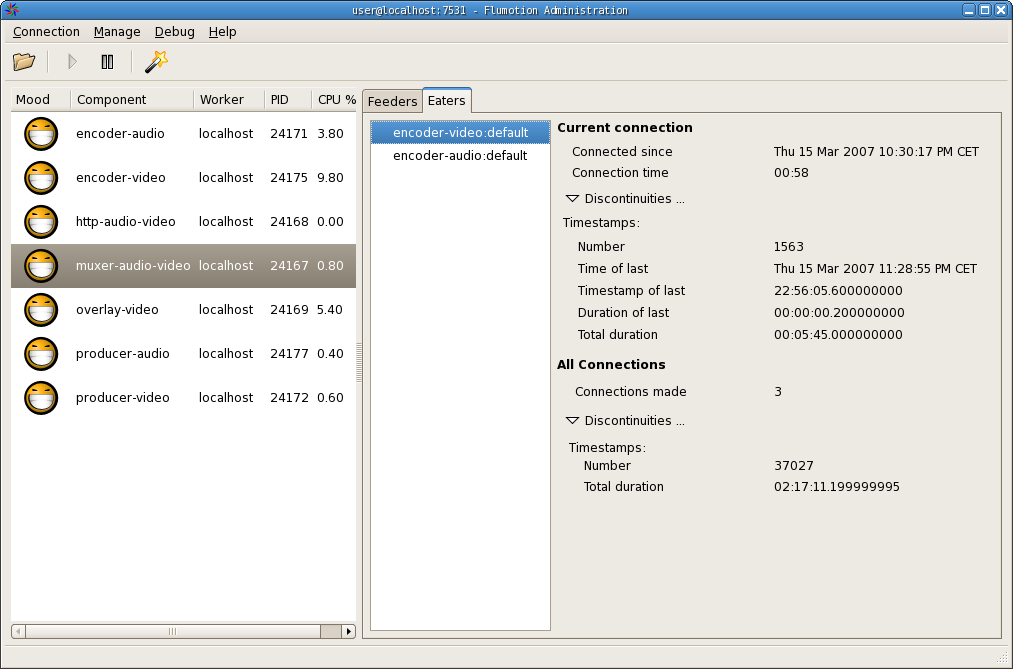
While I'm not entirely happy with this page yet, this does allow you to inspect each component's eaters, and check the continuity of timestamps and offsets where it makes sense. This allows you to figure out where errors get introduced (The numbers are high because I added drop-probability to the videotest and audiotest producers). With this, it was relatively easy to figure out that FLV was getting into trouble because audioresample was handling gaps wrong, but only when it was actually resampling. Gaps were ignored, it was just happily counting processed samples, and so increased the drift with every dropped buffer.
We're still trying to figure out where the problem is for WMV, but it looks like we are introducing rounding errors of the kind described above, combined with the WMA code not being very clear about how much samples it actually encoded in each buffer. I hope we find this final bug soon.
So, in a nutshell, Flumotion's synchronization infrastructure is pretty damn solid in the 0.4 series for the free formats. And for people writing components that implement other formats, or media processing, the tools are now there to figure out problems in non-optimal real life scenarios. A new release will be out soon as we finish testing.
Syntony
Over the last two weeks, at various but rare times, when I was left alone for stretches of time for longer than half an hour, I briefly touched on peeks of a flow state, the way I used to have them when I was purely developing. I do miss it. The last two weeks were sort of a meta-flow - every day was focused on getting as close to the sync problem as possible, all my brain waves were focusing on the main goal, and this goal was the flow. Coming out of that flow yesterday, deploying the fixes we think will help, and waiting to see if we actually fixed it, drops me out of that metaflow rudely. For half the day I did not know what to do given that my number one priority had suddenly moved into a have-to-wait state. I played with synergy, I played with xen, and I watched streams. At the end of today I can safely say that FLV is fixed, and WMV is not.
Phew, that must have been the longest entry I've ever written.
Synergy I have been using synergy for a little while now and I must say I like it. Basically, it allows you to use one keyboard and one mouse in...
![[lang]](/images/eye.png)